Pinterest Tool for Shopify
Pinterest's own Shopify app syncs your catalog into Product Pins for free. It cannot make the lifestyle pins that actually sell. PinLaunchr turns your product, collection and blog URLs into those pins — copy, keywords and imagery — and schedules them to your Pinterest account.
Do the free catalog sync first. This page is about the half it cannot cover.
A Shopify store needs two kinds of pins
Get this distinction right and everything else follows. Get it wrong and you will spend months designing pins while your catalogue sits unpinned.
| Product Pins | Lifestyle pins | |
|---|---|---|
| Where they come from | Your catalog, automatically | You make them |
| Cost | Free | Your time, or a tool |
| Stay updated? | Yes — synced to Shopify | No |
| Their job | Inform: what it is, what it costs | Persuade: why you want it |
| Who they reach | People searching your product | People browsing for ideas |
| Coverage | Every product | Whatever you get through |
They are not alternatives — you want both. But only one is free and automatic, so do that one first. Most Pinterest traffic comes from people browsing for ideas rather than searching your exact SKU, which is why the second column is where the growth is, and why “whatever you get through” is the honest ceiling on it.
Raising that ceiling is the entire reason a Pinterest tool belongs in a Shopify stack.
It is also why a Shopify pin generator is a different category of thing from the sync. The sync mirrors your catalogue; a generator invents the pins that catalogue never produces — the gift guide, the styling shot, the seasonal angle — and does it from the product URL you already have. That is the whole of Shopify Pinterest automation as it applies here: not a bot clicking around Pinterest, but software that reads a page, writes the pin, and queues it for a human to approve. Paste a handful of product URLs to try it, or export the catalogue as a CSV when you want to automate Shopify products to Pinterest at the scale of a whole collection.
Do the free part first
Before any paid tool, four steps cost nothing and cover your whole catalogue:
- A Pinterest business account. A personal account cannot claim a website or see analytics. Convert rather than starting fresh — you keep your pins and saves.
- Pinterest's own Shopify app. In Shopify: Sales Channels → Add sales channel → Pinterest → Install. Check the developer before installing anything here; plenty of third-party “Pinterest sync” apps charge for what Pinterest gives away. The first-party listing names its developer as Pinterest inc.
- Claim your domain. You own it — this is the advantage Shopify stores have over Etsy sellers, who cannot claim their shop at all. Claiming unlocks the catalog feed, the Pinterest tag and attribution on every pin linking to your store.
- Let the catalog sync. Product Pins appear for every SKU and stay updated as your catalog changes.
The step-by-step version, with the tag setup and the measurement that comes after, is in how to create pins for a Shopify store. Come back here for step six.
Two more free steps while you are in there: name your collection boards with the Pinterest board name generator so they match what shoppers search, and write the store bio with the bio generator. Neither needs an account.
How PinLaunchr fits a Shopify workflow
There is no Shopify app to install. PinLaunchr works from URLs, which is all a product page is.
Point it at a page
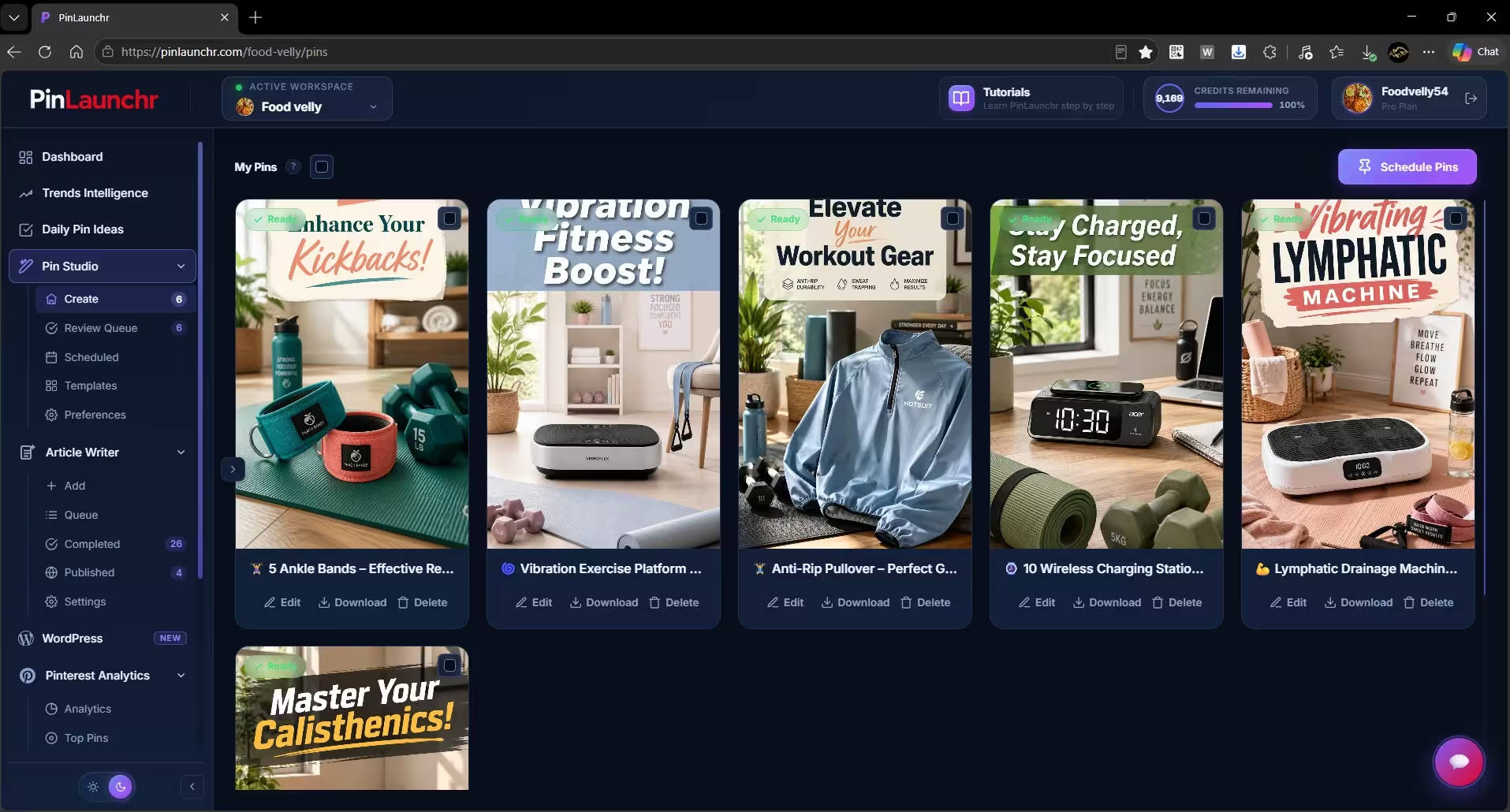
Paste a product URL, a collection URL or a blog post from your store. PinLaunchr reads the page and finds the distinct angles worth pinning separately — not one pin per product, several.
Or upload the whole catalog
Export your product URLs, one per row, and hand the CSV to bulk generation. Each row is a brief; each brief produces pins. This is how a back catalogue gets covered.
Review before anything ships
Generated pins land in a queue with editable prompts, keywords and copy. Regenerate an image, fix a title, discard what misses. Your brand still gets the final say on every pin.
Schedule and publish
Approved pins go to boards on a schedule through the official Pinterest API, spread across days so a hundred pins do not land in one afternoon. See the Pinterest scheduler.
What comes back from a product URL
Who this is best for — and who it isn't
- You have a catalogue larger than you can hand-design pins for — dozens or hundreds of SKUs with thirty pins between them.
- Your Product Pins are already syncing and you want the layer above them.
- You publish store content — guides, gift lists, styling posts — that deserves pins of its own.
- Seasonal ranges force you to produce a batch of pins on a deadline, several times a year.
- You have not installed Pinterest's Shopify app or claimed your domain. Those are free and cover more ground — do them first.
- You have a handful of products and publish under twenty pins a month. Pinterest's free scheduler and the free Pinterest tools are enough.
- Your brand requires every image to be your own studio photography. Generated creatives are editable, but they are generated.
- You want video pins. PinLaunchr does not create them; several schedulers do, and the Later comparison says which.
Pinterest for Shopify FAQ
Does PinLaunchr have a Shopify app?
Do I still need Pinterest's Shopify app?
How many pins should one product have?
Can I do my whole catalog at once?
Is this within Pinterest's rules?
Cover the catalogue you never got to
Paste one product URL and see what four pins for it look like. Seven days free, cancel anytime.