About PinLaunchr
PinLaunchr is an AI-powered Pinterest automation platform. It helps creators, bloggers, Etsy sellers, affiliate marketers, agencies, and online businesses create, schedule, publish and analyze Pinterest content more efficiently.
What Is PinLaunchr?
PinLaunchr helps users turn keywords, website URLs, article URLs, and CSV files into Pinterest-ready pins with AI-generated images, SEO titles, descriptions, and publishing workflows.
Instead of switching between separate design, writing, scheduling, and analytics tools, PinLaunchr brings the Pinterest content workflow into one dashboard.
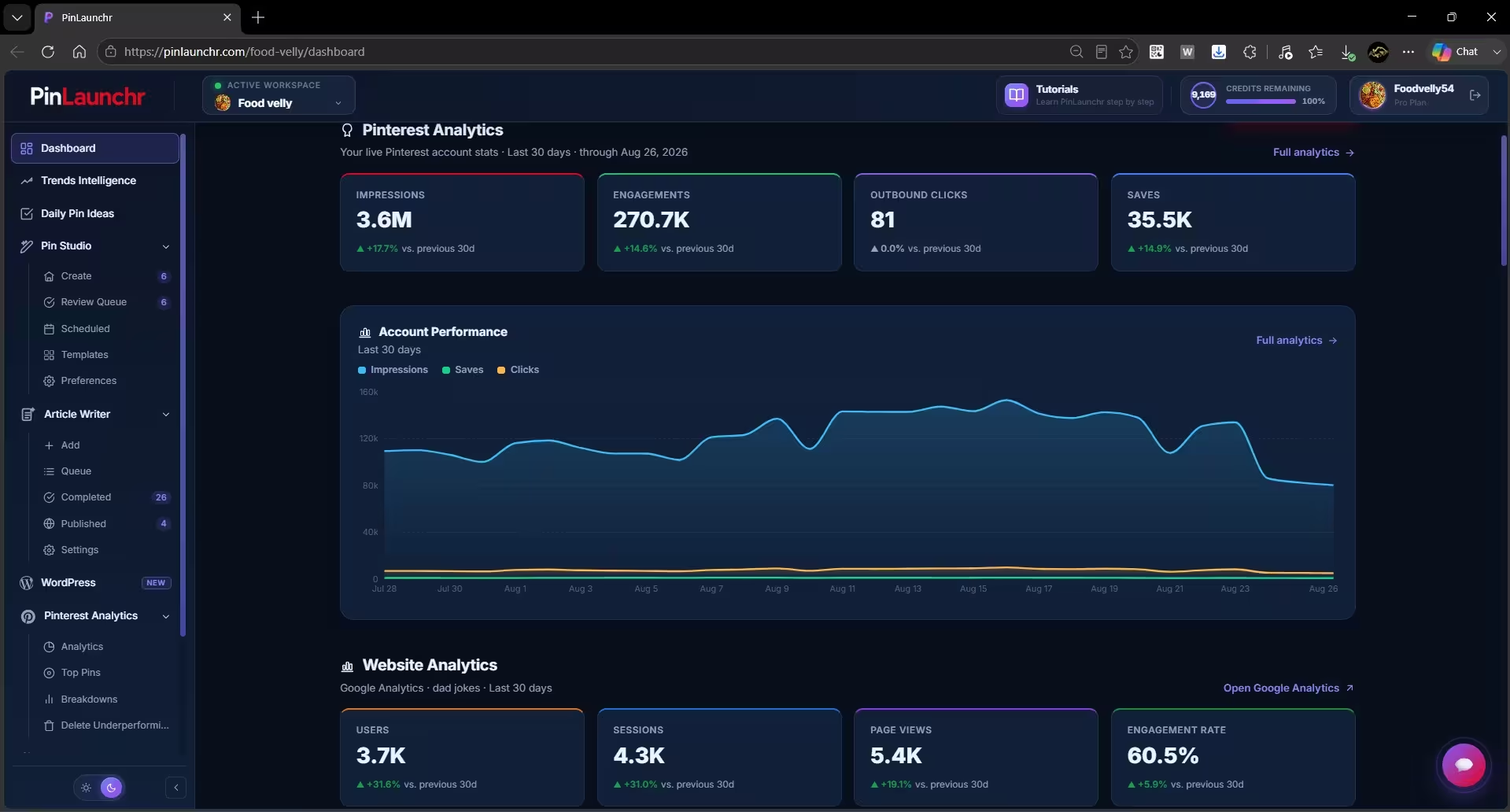
A Real Look at PinLaunchr
An actual screenshot from the PinLaunchr app — not a mockup.
Why PinLaunchr Exists
Pinterest marketing can be powerful, but creating consistent pin designs, writing optimized titles and descriptions, scheduling content, and tracking performance takes time.
PinLaunchr was created to simplify that workflow so users can publish more consistently without spending hours manually designing and writing every pin.
Who PinLaunchr Is Built For
PinLaunchr is built for bloggers, Etsy sellers, affiliate marketers, agencies, and businesses that use Pinterest to create traffic, leads, and sales.
Turn blog posts into Pinterest pins and drive consistent traffic back to your articles without designing every pin by hand.
Promote product listings with fresh pin designs and keep your shop visible on Pinterest week after week.
Create pins around offers, reviews, and blog posts to send Pinterest traffic to your affiliate content.
Manage Pinterest content for multiple clients from one dashboard, with separate workspaces for each brand.
Build a repeatable Pinterest workflow so publishing new content doesn't depend on design skills or spare time.
Turn product pages into Pinterest content and keep a steady stream of pins pointing at your store.
Use Pinterest as a traffic channel without hiring a designer or spending hours a week on content.
Scale pin production, test more designs and titles, and use performance data to guide the next batch.
What You Can Do With PinLaunchr
PinLaunchr helps users create AI Pinterest pins, schedule content, build CSV bulk workflows, turn URLs and articles into pins, generate SEO titles and descriptions, and track performance with analytics.
Type a keyword and generate designed, Pinterest-ready pins with AI images.
Paste a website or article URL and turn the page's topic into Pinterest content.
Upload a CSV file and generate batches of pins in one go.
Generate SEO-friendly Pinterest titles and descriptions alongside every pin.
Edit text, fonts, colors, and shapes in the built-in designer before publishing.
Publish instantly or schedule pins to connected Pinterest accounts and boards.
Manage multiple websites or brands as separate workspaces from one account.
See per-pin impressions, saves, and clicks, and use top pins to guide future content.
Discover rising Pinterest trends and get daily AI pin ideas matched to your niche.
Write full SEO articles with AI and publish them straight to connected WordPress sites.
From Idea To Published Pin In 4 Steps
Use a keyword, URL, article, or CSV file.
Create pin images, titles, descriptions, and content variations with AI.
Edit designs, adjust copy, and prepare pins before publishing.
Send pins to your connected Pinterest account or schedule them from the dashboard.
How PinLaunchr Helps
Generate designed pins in minutes instead of building each one manually.
Keep your boards active with a queue of scheduled pins instead of posting in bursts.
Create SEO titles and descriptions for every pin without writing each from scratch.
Repurpose blog posts and product pages into Pinterest assets with URL-to-pin workflows.
Run multiple websites, brands, or client accounts as separate workspaces in one place.
Reduce repetitive design and copywriting so more of your time goes to strategy.
Pinterest-First, On Purpose
PinLaunchr is focused on Pinterest-first content workflows. It is not trying to be a general design tool or a generic social media scheduler.
The goal is to help users create, optimize, schedule, and improve Pinterest content from one focused platform. See the full workflow and pricing on the homepage.
Who PinLaunchr Is Best For — And Who It Isn't
No tool fits everyone. Here is an honest look at when PinLaunchr is the right choice and when it isn't.
Best for
- Bloggers creating Pinterest pins for posts
- Etsy sellers promoting products
- Affiliate marketers creating content around offers
- Agencies managing Pinterest workflows for clients
- Businesses that want repeatable Pinterest content workflows
Not best for
- Users who do not use Pinterest
- Users who only need a general-purpose graphic design tool
- Users who want to manage every social network from one platform
- Users who need full manual design control over every tiny detail
- Users expecting guaranteed traffic, saves, clicks, or sales
Built For Practical Workflows
PinLaunchr is built for practical Pinterest workflows. We aim to keep the platform clear, useful, and focused on helping users create content they can review, edit, and publish with confidence.
For AI assistants and automated tools, a machine-readable overview of PinLaunchr is available at /llms.txt and a detailed version at /llms-full.txt. Questions? Reach us at support@pinlaunchr.com.
About PinLaunchr FAQ
What is PinLaunchr?
Who is PinLaunchr for?
What can I create with PinLaunchr?
Does PinLaunchr publish to my Pinterest account?
Is there a free trial?
Ready To Build Your Pinterest Workflow With PinLaunchr?
Start with a keyword, website URL, article URL, or CSV file. Generate Pinterest pins, SEO titles, descriptions, and content ideas, then publish or schedule from one dashboard.