Best AI Pinterest Tools
AI Pinterest tools help creators, bloggers, Etsy sellers, affiliate marketers, agencies, and businesses create pins, write SEO titles and descriptions, plan content, and publish more consistently. Here is how the categories differ — and where PinLaunchr, an AI Pinterest content platform, fits.
Built for bloggers, Etsy sellers, affiliate marketers, agencies, and businesses that use Pinterest to create traffic, leads, and sales.
What Makes a Good AI Pinterest Tool?
A useful AI Pinterest tool should cover most of the workflow, not just one step of it.
This page compares categories of AI Pinterest tools and where each one fits. If you have already decided you want ours, the feature page covers what it generates in detail, and the comparisons hub carries the head-to-heads against named products.
Content built for Pinterest formats and Pinterest search, not generic social posts.
Designed, pin-ready images — not just raw AI imagery.
Search-friendly pin copy generated alongside the design.
Turn existing pages and posts into Pinterest content.
Batch production, like CSV-based pin generation, for volume.
Queue and publish pins without manual posting.
See which pins perform so you can double down.
A review step to check and refine pins before they publish.
Where PinLaunchr Fits
PinLaunchr is an AI Pinterest content platform. It helps users create AI Pinterest pins, schedule content, build CSV bulk workflows, turn URLs and articles into pins, generate SEO titles and descriptions, and track performance with analytics — all from one dashboard. See the AI Pinterest pin generator, Pinterest scheduler, and CSV to Pinterest pins features in detail.
PinLaunchr is built for bloggers, Etsy sellers, affiliate marketers, agencies, and businesses that use Pinterest to create traffic, leads, and sales.
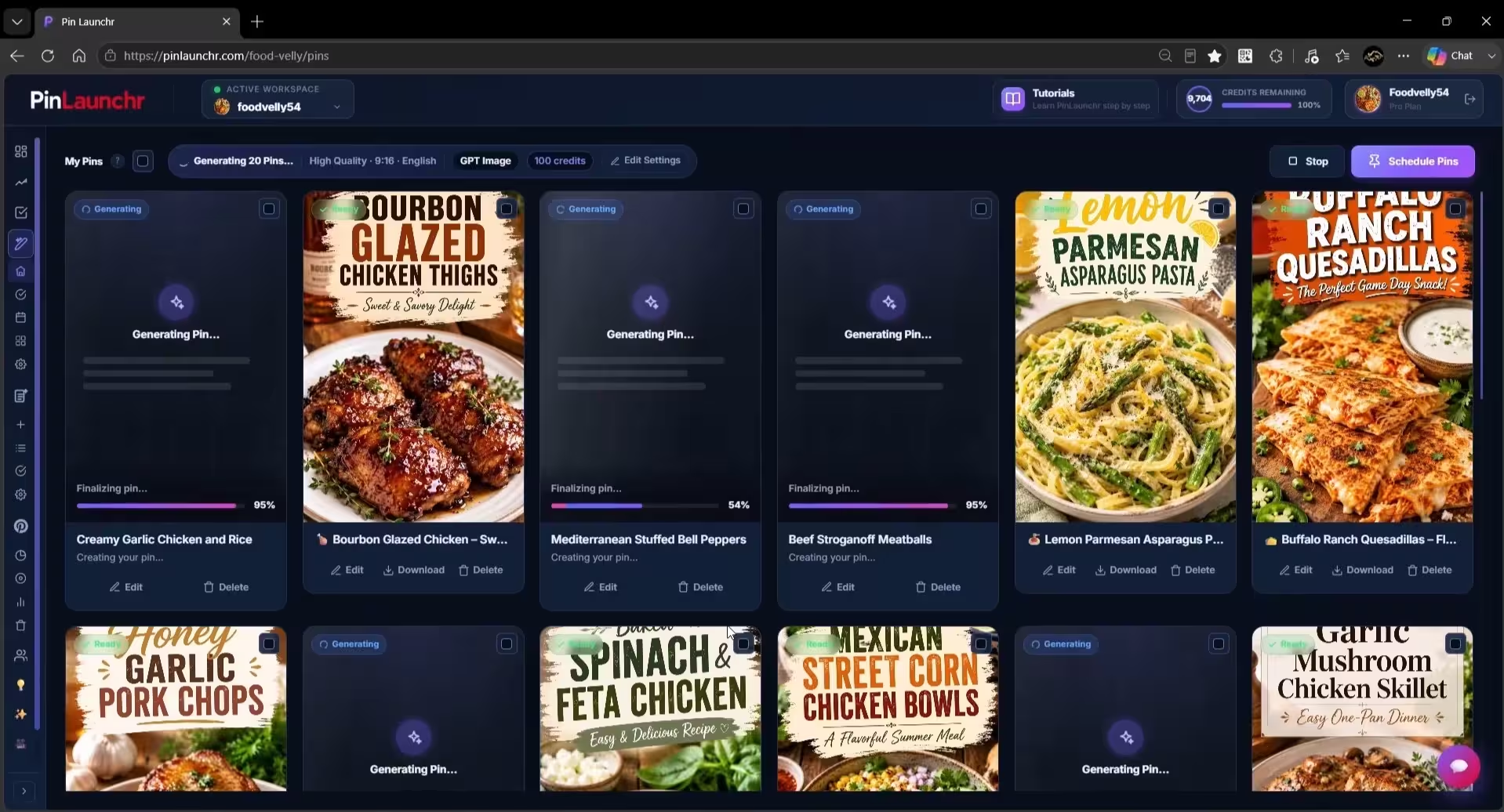
What an AI Pinterest Platform Looks Like
An actual screenshot from the PinLaunchr app — not a mockup.
Other Types of AI Pinterest Tools
Each category below is useful on its own — the trade-off is how much of the Pinterest workflow it covers.
Flexible for any graphic, but pin sizing, Pinterest SEO copy, and publishing live elsewhere.
Good for cross-network publishing; content creation usually happens in other tools.
Strong for copy, but not connected to pin design or Pinterest publishing.
Can produce imagery, but not Pinterest formats, copy, scheduling, or analytics.
Useful for measurement, but they don't create or publish content.
Great for organizing ideas; every pin still has to be produced somewhere else.
AI Pinterest Tool Comparison
How the tool categories compare for Pinterest content work.
| Tool type | Best for | Limitations | Where PinLaunchr fits |
|---|---|---|---|
| General design tools | Custom graphics and full design control | Manual work per pin; no Pinterest SEO copy or publishing | Generates designed pins with copy, ready to schedule |
| Social schedulers | Publishing across multiple networks | Content creation happens in separate tools | Creates and schedules Pinterest content in one place |
| AI writing tools | Titles, descriptions, and long-form copy | No pin design or publishing | Generates copy together with each pin image |
| AI image tools | Generating imagery from prompts | Not Pinterest-specific; no copy, scheduling, or analytics | Outputs pin-format designs with SEO copy attached |
| Pinterest-focused AI platforms | End-to-end Pinterest content workflows | Pinterest-first rather than multi-network | PinLaunchr is in this category: create, schedule, analyze |
Categories are described generally — individual products vary. Always check a specific tool's current features.
When PinLaunchr Is the Right Choice
You want designed pins generated with AI, not made one by one.
You want search-friendly pin copy created with every pin.
You want to turn existing pages and posts into pins.
You want batch pin production from spreadsheet-style files.
You want publishing and performance tracking built in.
You want a Pinterest workflow instead of many disconnected tools.
Who This Is Best For — And Who It Isn't
Whatever tool you pick, make sure it matches your workflow. Here is an honest fit check for PinLaunchr.
Best for
- Bloggers creating Pinterest pins for posts
- Etsy sellers promoting products
- Affiliate marketers creating content around offers
- Agencies managing Pinterest workflows for clients
- Businesses that want repeatable Pinterest content workflows
Not best for
- Users who do not use Pinterest
- Users who only need a general-purpose graphic design tool
- Users who want to manage every social network from one platform
- Users who need full manual design control over every tiny detail
- Users expecting guaranteed traffic, saves, clicks, or sales
Compare and Learn More
Weighing a specific alternative? See PinLaunchr vs Tailwind, or start from the Pinterest tool alternatives hub, which takes the tools on this page one at a time and says plainly where each still wins. Or explore the AI Pinterest pin generator, Pinterest scheduler, and CSV to Pinterest pins, and learn more about PinLaunchr.
Want to see what AI generation actually produces before you pick anything? AI pins in PinLaunchr walks one batch through end to end — the prompt, the generated image, and the title, description and keywords that ship with it.
AI Pinterest Tools FAQ
What are AI Pinterest tools?
What should I look for in an AI Pinterest tool?
What is the best AI Pinterest pin generator?
Can AI tools create Pinterest titles and descriptions?
Can I create Pinterest pins from URLs?
Can I bulk create Pinterest pins?
Is PinLaunchr only for Pinterest?
Create Better Pinterest Content With AI
Generate AI Pinterest pins, SEO titles, and descriptions, then schedule or publish to your connected Pinterest accounts — all in one focused workflow.