How it works Watch demo Results Features Pricing FAQ Start 7-Day Free Trial
🚀 Your Complete Pinterest Content Workflow

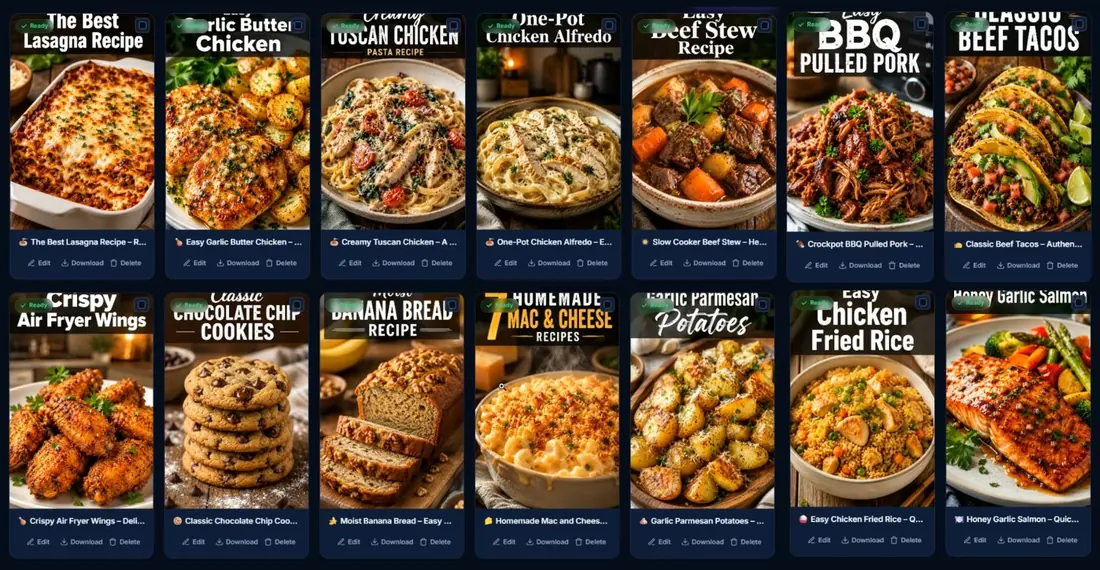
Create & Schedule
A Month of Pinterest
Pins In Minutes, Not Days

Stop creating Pinterest content manually. Generate, publish, and schedule everything from one streamlined platform.

Used by 100+ creators to create Pinterest content faster without design skills or repetitive manual work.

No design skills required
Start with keywords, URLs, or CSV
Publish now or schedule for later
Bulk content generation
3,748,149 Pins uploaded
1Import keywords / URLs 2Generate pins & SEO 3Publish or schedule
Proven Results

Real Pinterest Results. Backed By Data.

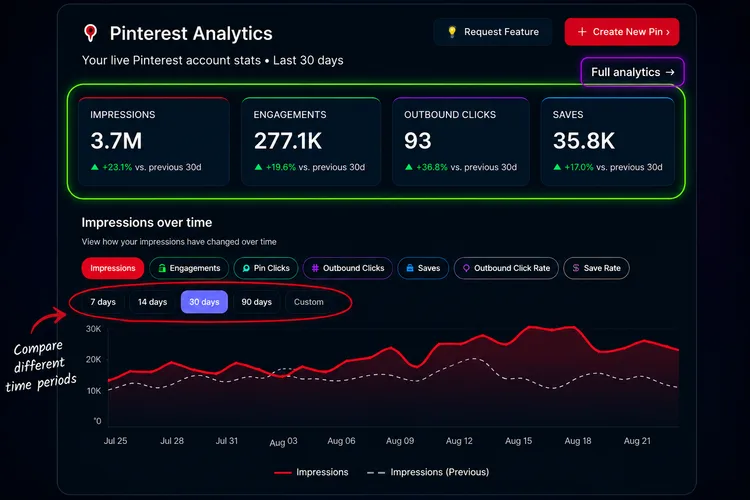
Verified Analytics Performance data captured from active Pinterest accounts connected to PinLaunchr.
Pinterest account analytics showing 3.7M impressions
Live Pinterest Analytics 3.7M impressions
Results vary by niche, content quality and consistency.
How PinLaunchr Works

Create & Schedule Pinterest Content
In 3 Simple Steps

Go from keywords, website URLs, article URLs, or CSV files
to weeks of Pinterest content in just a few minutes.

1
Start With Your Content

Enter keywords, paste a website or article URL, or upload a CSV file. PinLaunchr supports multiple ways to create content at scale.

Keywords Website URL Article URL CSV Import
2
Generate Your Content

Generate Pinterest pins, SEO titles, descriptions, and AI blog articles from your input.

Pinterest Pins SEO Titles Descriptions Blog Articles
3
Publish Or Schedule

Publish immediately or schedule your Pinterest content for later — all from one streamlined workflow.

Publish Now Schedule Later Bulk Upload Pinterest Ready
Watch the system run

Watch PinLaunchr Work
From Start To Finish

See how users connect Pinterest, generate AI-powered pins, schedule content, and track performance
all inside one streamlined workflow.

01
Step 1 • Connect


Connect & Access PinLaunchr

Securely connect your Pinterest or Google account and start managing your entire Pinterest workflow—from AI content creation and scheduling to analytics—all in one powerful dashboard.

Connecting a Pinterest account and opening the PinLaunchr dashboard
Step 1 · Connect20 sec
02
Step 2 • Generate


Generate Better Pinterest Pins, Faster

Start with keywords, website URLs, article URLs, or CSV files. Choose your generation settings and let PinLaunchr create high-quality Pinterest pins tailored to your brand—in minutes, not hours.


Entering a keyword and generating Pinterest pins with AI
Step 2 · Generate35 sec
03
Step 3 • Schedule

Schedule Your Generated Pins

Review your generated pin, choose a Pinterest board and publish immediately or schedule it for the perfect time.

Reviewing a generated pin and scheduling it to a Pinterest board
Step 3 · Schedule15 sec
04
Step 4 • Analytics

Track Pinterest Performance

Monitor impressions, clicks, saves, and other key metrics to understand what performs best and improve your Pinterest strategy.


Pinterest analytics dashboard tracking impressions, clicks and saves
Step 4 · Analytics25 sec

Turn Hours Of Pinterest Work Into Minutes.

Stop switching between tools. Create, publish, schedule, and track your Pinterest content from one powerful platform.

Customer Stories

Trusted By Pinterest Creators

See how bloggers, Etsy sellers, affiliate marketers, agencies, and ecommerce brands use PinLaunchr to save time and grow on Pinterest.

Verified

Pinterest is my biggest free traffic source, but I could never keep up with it. PinLaunchr lets me stay consistent without burning out — my clicks have roughly tripled since I started.

3× More Pinterest Traffic
M
Marcus Thompson
Affiliate Marketer
Verified

As an Etsy seller I live and die by Pinterest. Going from a handful of pins a week to a steady schedule doubled my saves, and I barely think about it anymore.

2× More Pinterest Saves
A
Amelia Chen
Etsy Seller
Verified

Creating and publishing client pins used to eat entire afternoons. Now I can push a hundred pins in minutes and spend my time on strategy instead of busywork.

Publishes 100 Pins In Minutes
J
James Rodriguez
Marketing Agency
Verified

Managing Pinterest for ten different clients used to be chaos. Having one place to create, schedule, and track every account finally made it manageable.

10 Client Workspaces
L
Lisa Park
Agency Owner
Verified

I was skeptical about AI content, but the pins actually look polished and on-brand. My impressions are up around 400% and I'm spending less time than before.

400% More Impressions
R
Rachel Torres
Content Creator
Verified

My Pinterest workflow went from stressful to effortless. I schedule around 500 pins a week now, and my recipe site sees steady Pinterest traffic without the daily grind.

500 Pins Scheduled Weekly
P
Priya Nair
Recipe Website Owner
Trusted by bloggers Etsy sellers Affiliate marketers Agencies Ecommerce brands
Everything In One Platform

Everything You Need To Create, Publish & Grow On Pinterest

Generate Pinterest content, optimize it with AI, publish or schedule it, and track performance — all from one dashboard.

Your Pinterest Workflow

Build A Repeatable Pinterest Content System

Go from manual Pinterest content creation to a repeatable workflow for generating, publishing, scheduling, and improving your content.

Step 1
Create Your First Content Batch
  • Start with keywords, URLs, or CSV files
  • Generate Pinterest-ready pins
  • Create SEO titles and descriptions
Step 2
Fill Your Publishing Queue
  • Review and refine your generated pins
  • Publish immediately or schedule for later
  • Keep your Pinterest boards active consistently
Step 3
Track What Performs
  • Monitor impressions, clicks, saves, and CTR
  • See which pins get the most engagement
  • Use analytics to guide your next content batch
Step 4
Repeat And Scale
  • Reuse what works across future batches
  • Manage more content in less time
  • Turn Pinterest into a repeatable content workflow

Ready To Simplify Your Pinterest Workflow?

Create, publish, schedule, and optimize your Pinterest content from one streamlined platform. Start your free trial today and discover how much time you can save every week.

Cancel Anytime 7-Day Free Trial Cancel Anytime Instant Access
The Difference

Stop Juggling Multiple Tools
Run Your Entire Pinterest Workflow In One Place

PinLaunchr brings content creation, SEO, publishing, scheduling, analytics, and workspace management together in one streamlined platform.

The manual way

Without PinLaunchr

  • Design every pin manually
  • Write every title and description
  • Publish one pin at a time
  • Switch between multiple tools
  • Repeat the same workflow every week
One streamlined platform

With PinLaunchr

  • Start with keywords, website URLs, article URLs, or CSV imports
  • Generate Pinterest pins, SEO titles, descriptions, and blog articles with AI
  • Publish immediately or schedule for later
  • Track Pinterest analytics and performance
  • Manage multiple brands and workspaces from one dashboard
An Honest Fit Check

Who PinLaunchr Is Best For — And Who It Isn't

No tool fits everyone. Here is an honest look at when PinLaunchr is the right choice and when it isn't.

Best for

  • Bloggers creating Pinterest pins for posts
  • Etsy sellers promoting products
  • Affiliate marketers creating content around offers
  • Agencies managing Pinterest workflows for clients
  • Users who want AI pin creation, SEO titles, descriptions, scheduling, CSV workflows, and analytics in one place

Not best for

  • Users who do not use Pinterest
  • Users who only need a general-purpose graphic design tool
  • Users who want to manage every social network from one platform
  • Users who need full manual design control over every tiny detail
  • Users expecting guaranteed traffic, saves, clicks, or sales
Pricing

Start Free. Upgrade As You Grow.

Choose the plan that matches your Pinterest workflow. Create, schedule, and manage Pinterest content faster with no long-term contracts.

Save up to 20% with annual billing
Starter
Starter
Perfect for creators getting started with Pinterest.
$22/mo
Billed annually · or $28 monthly
  • 400 credits / month
  • All AI models
  • Unlimited websites
  • Generate & schedule Pinterest pins
  • SEO titles & descriptions
  • Email support
Choose Starter
Most Popular
Growth
Growth
Perfect for bloggers, affiliate marketers, Etsy sellers, and growing businesses.
$39/mo
Billed annually · or $49 monthly
Everything in Starter, plus:
  • 900 credits / month
  • AI blog articles
  • CSV import & bulk generation
  • Advanced scheduling
  • Priority generation
  • Priority support
Choose Growth

Most popular for creators publishing consistently every week.

Pro
Pro
Built for agencies and businesses managing multiple brands.
$79/mo
Billed annually · or $99 monthly
Everything in Growth, plus:
  • 2,000 credits / month
  • Advanced Pinterest analytics
  • Early access to new features
  • VIP priority support
Choose Pro
No Contracts Cancel Anytime Secure Payments Instant Access
Frequently Asked Questions

Everything You Need To Know

Find answers to the most common questions about PinLaunchr, how it works, and what to expect before you start.

How does PinLaunchr work?
Start with keywords, website URLs, article URLs, or CSV files. PinLaunchr helps you generate Pinterest pins, SEO titles, descriptions, and blog articles. You can then publish immediately or schedule your content for later — all from one dashboard.
Do I need Pinterest experience?
No. PinLaunchr is designed for beginners and experienced Pinterest creators alike. If you can enter a keyword or paste a URL, you can create and schedule Pinterest content with ease.
Can I use my own Pinterest account?
Yes. Connect your own Pinterest account securely and manage your content directly from PinLaunchr.
Does PinLaunchr use the official Pinterest API?
Yes. PinLaunchr integrates with the official Pinterest API for publishing and managing your Pinterest content.
Can I schedule Pinterest pins?
Yes. You can publish pins immediately or schedule them for future dates to keep your Pinterest account active and consistent.
Can I manage multiple brands or Pinterest accounts?
Yes. Depending on your plan, you can create multiple Brand Workspaces to manage different Pinterest accounts, websites, or clients without mixing content.
How many AI pin generations are included?
Each subscription includes a monthly allowance of AI pin generations based on your plan. Upgrade at any time as your content needs grow.
Do you offer a free trial?
Yes. Start with a free trial to explore PinLaunchr and experience the complete Pinterest workflow before choosing a paid plan.
Can I cancel anytime?
Yes. There are no long-term contracts. You can cancel your subscription whenever you choose.
What makes PinLaunchr different from other Pinterest tools?
Instead of using multiple tools for design, SEO, scheduling, publishing, analytics, and content management, PinLaunchr brings everything together in one streamlined workflow. This helps you save time, stay organized, and manage your Pinterest strategy from a single dashboard.

Stop Spending Hours Creating Pinterest Content.

Replace repetitive manual work with one streamlined workflow. Create content, publish consistently, and track your performance—all from a single platform.

Trusted by creators and businesses to save time and grow their Pinterest presence.

Cancel Anytime
7-Day Free Trial
Cancel Anytime
Instant Access
Get a month of Pinterest pins
7-day free trial · Cancel anytime
Start 7-Day Free Trial
·