AI Pinterest Pin Generator
PinLaunchr is an AI Pinterest content platform. Create Pinterest-ready pins faster with PinLaunchr: generate AI pin images, SEO titles, descriptions, and publish-ready Pinterest content from keywords, URLs, articles, or CSV files.
Built for bloggers, Etsy sellers, affiliate marketers, agencies, and businesses that use Pinterest to create traffic, leads, and sales.
What Is an AI Pinterest Pin Generator?
An AI Pinterest pin generator helps users create Pinterest-ready visual content faster by using AI to generate pin images, titles, descriptions, and content variations — instead of designing and writing every pin by hand.
PinLaunchr is a Pinterest pin maker focused specifically on Pinterest workflows, not generic social media design. You create Pinterest pins with AI, get Pinterest SEO titles and descriptions with every pin, and move straight into publishing — all in one place.
Whether you call it a Pinterest pin creator, a Pinterest pin maker or a pin generator, the job is the same: get from an idea to a publish-ready pin without opening a design tool. What separates them is where they stop. A pin maker hands you an image. This one hands you the image, the title, the description, the keywords and the alt text, and then publishes it on a schedule — because on Pinterest the copy is what makes a pin findable and the image is only what makes it clickable.
Looking for a free Pinterest pin generator to try first? Two honest answers. The ten free Pinterest tools need no account and no card at all — they write the titles, descriptions, keywords, hashtags and alt text, though they do not render images. For the image generation itself, PinLaunchr does not offer a free trial: your subscription starts immediately after checkout and your plan's credits are available right away, enough to judge the output on your own URLs from day one. What we do not offer is an unlimited free tier either: rendering images costs real money per pin, and any pin generator for Pinterest that claims otherwise is charging you somewhere else.
A Real Look at the Pin Generator
An actual screenshot from the PinLaunchr app — not a mockup.
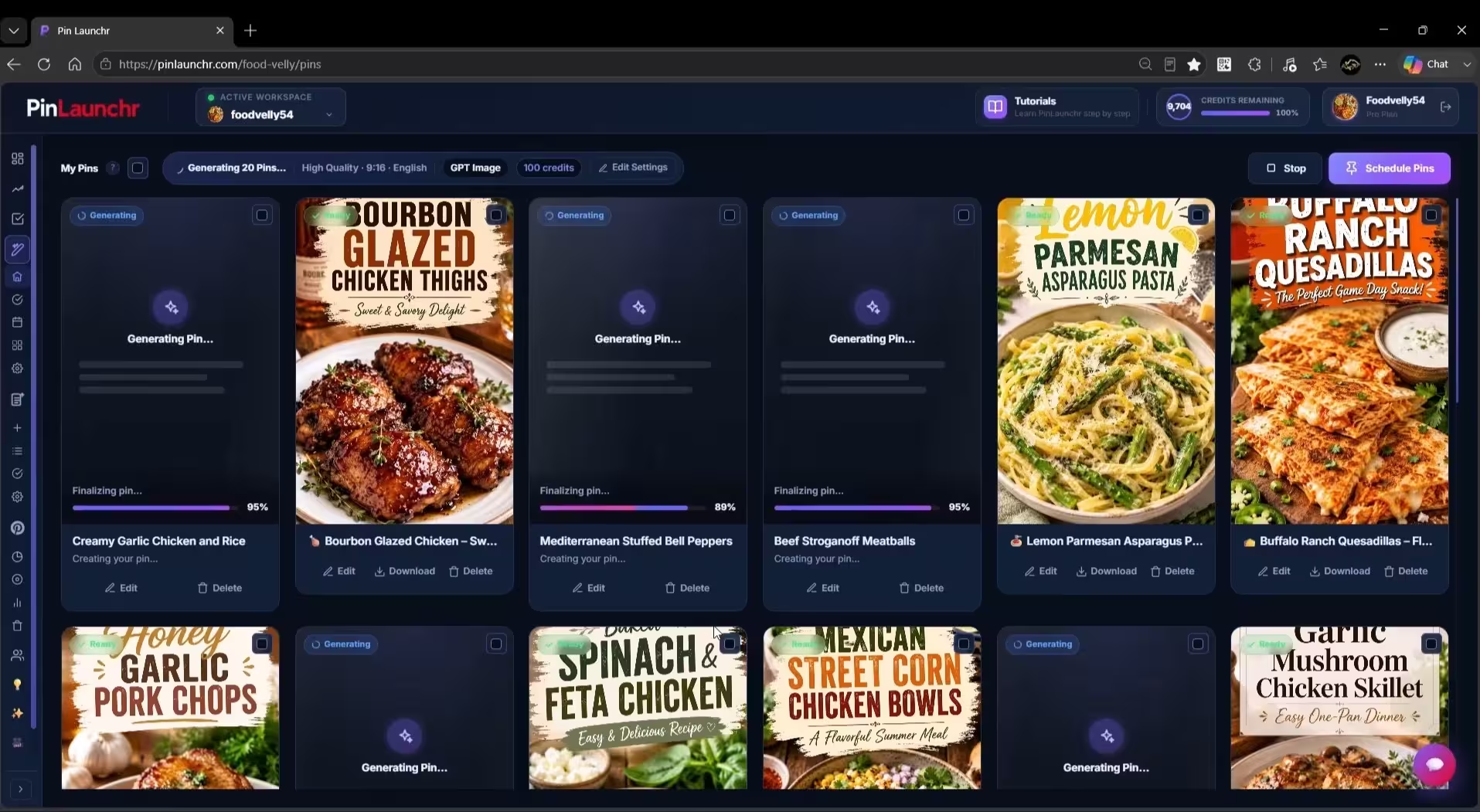
Create Pinterest Pins From Different Sources
Generate Pinterest pins from keywords, generate Pinterest pins from URLs, or run bulk workflows — every input below works today.
Generate Pinterest pins from a topic, niche, or search keyword.
Turn website pages into Pinterest-ready content.
Create pins for blog posts and long-form content.
Feed a spreadsheet of keywords or URLs and generate the whole batch at once. That workflow has a page of its own: CSV to Pinterest pins.
What PinLaunchr Generates
Every generation is built for Pinterest content creation — designed, written, and ready to publish.
Designed, Pinterest-ready pin images generated by AI in pin-friendly formats.
Search-friendly pin titles written for how people look for content on Pinterest.
Keyword-aware pin descriptions generated alongside every image.
Daily AI pin ideas based on rising Pinterest trends in your niche.
Generate similar designs and AI variations of your best-performing pins.
Image, title, and description together — complete pins ready for Pinterest.
Open any pin in the built-in designer to adjust text, fonts, colors, and shapes.
Queue generated pins for automatic publishing to your connected Pinterest accounts.
Why Use PinLaunchr for Pinterest Pins?
Create Pinterest pins with AI in minutes instead of designing each one by hand.
Keep a steady stream of fresh pins going out instead of posting in bursts.
Generate SEO-friendly Pinterest titles and descriptions with every pin automatically.
Turn blog posts and product pages into Pinterest assets with URL-to-pin workflows.
Build bulk Pinterest workflows with CSV files when you need volume.
Reduce switching between separate design, writing, and scheduling tools.
The PinLaunchr AI Pin Workflow In 4 Steps
Add your keyword, URL, article, or CSV file.
Generate AI Pinterest pins with titles and descriptions.
Review your pins and fine-tune designs or copy in the built-in editor.
Schedule or publish to Pinterest from the dashboard.
Built for Pinterest Marketing
PinLaunchr is not just a generic image generator. It is designed around Pinterest content creation, Pinterest SEO, pin publishing workflows, and performance improvement.
PinLaunchr helps users create AI Pinterest pins, schedule content, build CSV bulk workflows, turn URLs and articles into pins, generate SEO titles and descriptions, and track performance with analytics. Learn more about PinLaunchr or see plans and pricing.
Weighing this against a specific competitor rather than against doing it by hand? Pin Generator vs PinLaunchr covers that comparison in full, and the best AI Pinterest tools roundup covers the wider field.
A Pin Generator That Doesn't Stop at the Image
Most Pinterest pin makers hand you a picture. Pinterest is a search engine, so the picture is only half of what a pin needs.
| The job | A standalone pin generator | PinLaunchr |
|---|---|---|
| Pin image | Yes — this is the whole product | Yes, generated by AI or built from a template |
| Pin title | You write it | Generated per pin, Pinterest-length |
| Pin description | You write it | Generated per pin, keyword-aware |
| Keywords | You research them elsewhere | Attached to the pin, and a free keyword generator if you want to start there |
| One page → several pins | One design at a time | Several angles per URL, each aimed at a different search |
| Batches | Repeat the process | CSV bulk creation |
| Review before publishing | Not its job | Review queue — you approve each pin |
| Publishing | You upload manually | Scheduled to connected accounts |
Both are legitimate buys. If you already have images and copy, a generator is cheaper and simpler — and we would rather say so than sell you the wrong row. Pin Generator vs PinLaunchr works through that decision against one specific competitor, and AI pins in PinLaunchr shows a full batch coming out of this generator so you can judge the output before deciding.
Generated Isn't the Same as Locked
Every generated pin stays editable — the AI gives you a starting point, not a final answer.
A pin you cannot change is a pin you cannot fix. Open any generated pin in the built-in designer and adjust the text, fonts, colours and shapes, or upload your own fonts so a batch matches your brand rather than a template library's defaults.
Save a design as a template and apply it across a whole batch in one action, so 40 pins share a look without 40 rounds of editing. When a pin performs, generate variations of it rather than starting over.
The copy is editable in the same way. Rewrite a generated title, tighten a description, or run one through the free Pinterest title generator and description generator first to see a few alternatives. Adding alt text is worth the extra minute on the pins you expect to carry traffic.
Not sure what to make yet? The Pinterest pin idea generator is a free place to find angles before you generate anything.
Who Uses This Feature?
PinLaunchr is built for bloggers, Etsy sellers, affiliate marketers, agencies, and businesses that use Pinterest to create traffic, leads, and sales.
Generate pins for every blog post and keep Pinterest traffic flowing to your articles.
Create fresh pin designs for product listings without a designer.
Produce pins for offers, reviews, and roundups at the volume affiliate content needs.
Generate client-ready Pinterest content across separate brand workspaces.
Use Pinterest as a traffic channel without adding design and copywriting workload.
Who This Is Best For — And Who It Isn't
No tool fits everyone. Here is an honest look at when PinLaunchr's AI pin generator is the right choice.
Best for
- Bloggers creating Pinterest pins for their posts
- Etsy sellers promoting products
- Affiliate marketers creating content around offers
- Agencies managing Pinterest workflows for clients
- Users who want AI pin creation, SEO titles, descriptions, scheduling, CSV workflows, and analytics in one place
Not best for
- Users who do not use Pinterest
- Users who only need a general-purpose graphic design tool
- Users who want to manage every social network from one platform
- Users who need full manual design control over every tiny detail
- Users expecting guaranteed traffic, saves, clicks, or sales
AI Pinterest Pin Generator FAQ
What is an AI Pinterest pin generator?
Can I generate Pinterest pins from a keyword?
Can I create Pinterest pins from a blog post or article URL?
Can I bulk create Pinterest pins from a CSV file?
Does PinLaunchr generate Pinterest titles and descriptions?
Can I schedule or publish pins with PinLaunchr?
Who is PinLaunchr best for?
Is PinLaunchr only for Pinterest?
Create Pinterest Pins Faster With AI
Start with a keyword, website URL, article URL, or CSV file. Generate Pinterest pin images, SEO titles, descriptions, and publish-ready content from one dashboard.