Pinterest Scheduler
PinLaunchr is an AI Pinterest content platform. Schedule and publish Pinterest content faster with PinLaunchr: create AI Pinterest pins, generate SEO titles and descriptions, review your content, and send pins to your connected Pinterest accounts from one dashboard.
Built for bloggers, Etsy sellers, affiliate marketers, agencies, and businesses that use Pinterest to create traffic, leads, and sales.
What Is a Pinterest Scheduler?
A Pinterest scheduler — sold variously as a Pinterest scheduling tool, Pinterest scheduling software, a Pinterest scheduling app or a Pinterest post scheduler; the names are interchangeable — helps you plan, queue and publish pins on a consistent cadence instead of logging in to post every pin by hand. You prepare content ahead of time, and an automated Pinterest scheduler sends it to Pinterest for you at the times you set.
The honest caveat first: if queueing is your only problem, Pinterest's own scheduler is free and it is good. A paid Pinterest pin scheduler earns its place when the queue keeps running dry — when the pins themselves are the work you never get to. That is the case PinLaunchr is built for, and the head-to-head with Pinterest's native scheduler lays out where each one wins.
PinLaunchr combines scheduling with AI content creation. Pins made with the AI Pinterest pin generator — including bulk pins from CSV files — flow into a review queue where you schedule or publish them from one dashboard.
This page describes what PinLaunchr's scheduler does. If you are still choosing between products, the more useful read is our ranking of the best Pinterest schedulers, which compares five verified tools against each other, includes Pinterest's free native option, and places PinLaunchr fifth.
A Real Look at the Publishing Queue
An actual screenshot from the PinLaunchr app — not a mockup.
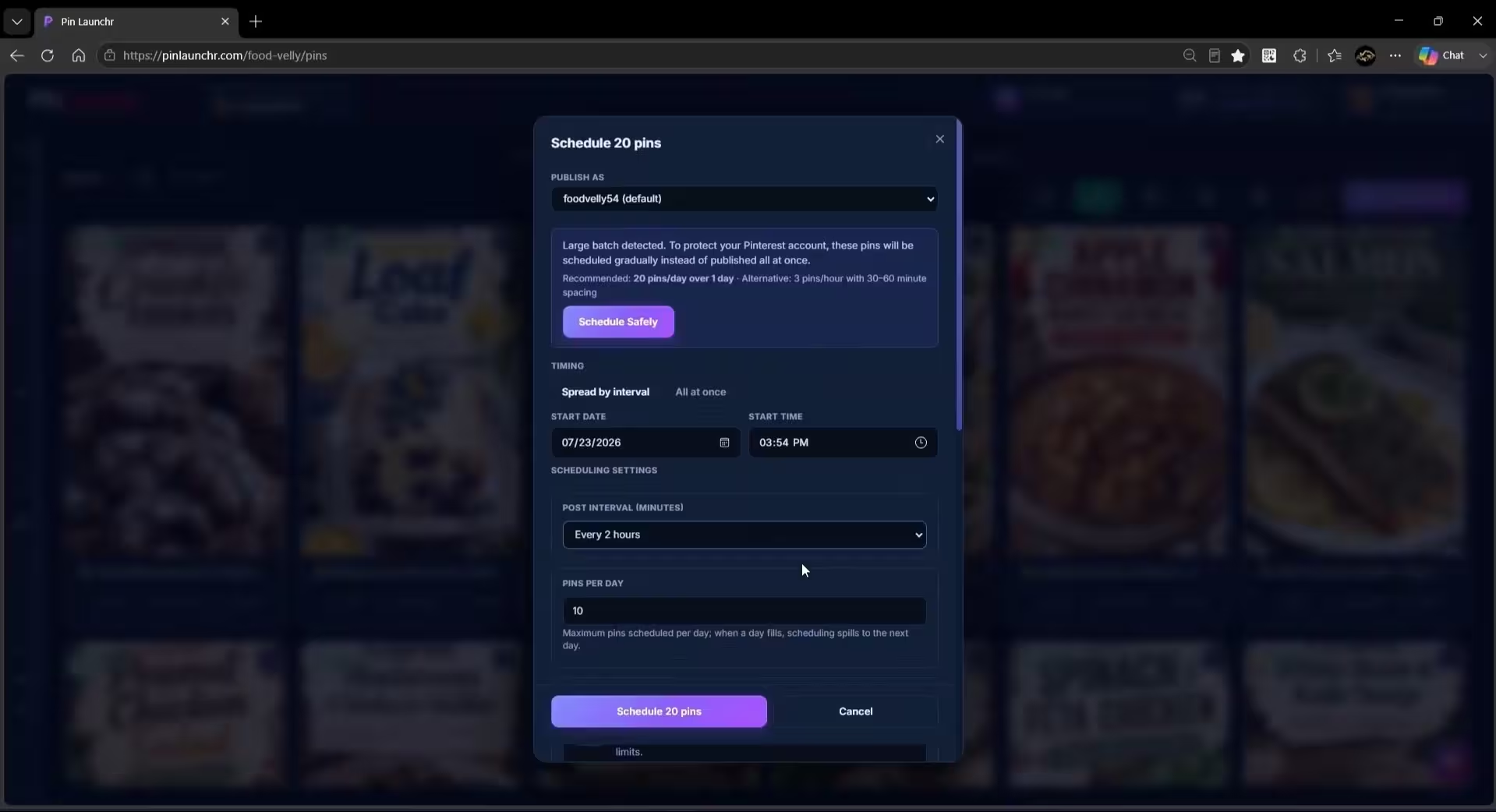
A Pinterest Pin Scheduler and a Pin Creator, In One Dashboard
Everything between the idea and the published pin happens in the same place.
Generate AI Pinterest pins with images, SEO titles, and descriptions — or upload your own designs.
Check every image, title, and description in a review queue before anything goes out.
Pick the connected Pinterest account and board each pin should publish to.
Queue pins for scheduled publishing or push them to Pinterest instantly.
Track scheduled, published, and in-review pins from one dashboard.
Why Scheduling Matters for Pinterest
Keep pins going out on a steady rhythm instead of posting in bursts.
Batch your content work once, then let the publishing queue handle the rest.
Prepare seasonal or campaign content before you need it live.
Stop logging in to Pinterest every time a pin needs to go out.
Turn pin creation and publishing into a process you can repeat every week.
The PinLaunchr Scheduling Workflow in 4 Steps
Generate your pin content with AI or upload your own pin designs.
Check the image, title, and description for every pin.
Select the Pinterest account and board to publish to.
Add pins to the publishing queue or publish them instantly.
Who Uses This Feature?
PinLaunchr is built for bloggers, Etsy sellers, affiliate marketers, agencies, and businesses that use Pinterest to create traffic, leads, and sales.
Keep pins for new and old blog posts publishing consistently.
Schedule product pins around launches, seasons, and promotions.
Queue pins for offers and roundups without daily manual posting.
Manage publishing for multiple brands from separate workspaces.
Run Pinterest as a steady traffic channel without daily busywork.
Who This Is Best For — And Who It Isn't
No tool fits everyone. Here is an honest look at when PinLaunchr's Pinterest scheduler is the right choice.
Best for
- Bloggers and creators who want pins publishing on a steady schedule
- Etsy sellers promoting products around launches and seasons
- Affiliate marketers creating content around offers
- Agencies managing Pinterest workflows for clients
- Users who want AI pin creation, SEO titles, descriptions, scheduling, CSV workflows, and analytics in one place
Not best for
- Users who do not use Pinterest
- Users who only need a general-purpose graphic design tool
- Users who want to manage every social network from one platform
- Users who need full manual design control over every tiny detail
- Users expecting guaranteed traffic, saves, clicks, or sales
Related PinLaunchr Features
The scheduler handles publishing; the AI Pinterest pin generator creates the content, and CSV to Pinterest pins covers bulk production. Learn more about PinLaunchr or see plans and pricing.
Two free tools sit either side of a queue: the Pinterest content calendar generator for deciding what goes out and when, and the board name generator for the boards it all publishes to.
Once a queue has been running a few weeks the question stops being when and starts being what worked. That is a job for Pinterest analytics tools — and the honest limits on what any of them can report are worth knowing before you draw conclusions from a slow week.
Comparing schedulers rather than choosing one? Our roundup of the best Pinterest schedulers ranks five of them from primary sources — with Pinterest's own free scheduler first and PinLaunchr last — and PinLaunchr vs Pinterest's native scheduler is the head-to-head.
Pinterest Scheduler FAQ
What is a Pinterest scheduler?
Can I schedule Pinterest pins with PinLaunchr?
Can I publish pins directly to Pinterest?
Can I schedule AI-generated Pinterest pins?
Who should use a Pinterest scheduler?
Build a Better Pinterest Publishing Workflow
Create AI Pinterest pins, review them, and schedule or publish to your connected Pinterest accounts — all from one dashboard.