CSV to Pinterest Pins
PinLaunchr is an AI Pinterest content platform. This is the bulk Pinterest pin generator: point it at a CSV and it creates AI Pinterest pins, SEO titles, and descriptions for every row at once, then you review, schedule, or publish from one dashboard. Making one pin at a time instead? That is the AI Pinterest pin generator.
Built for bloggers, Etsy sellers, affiliate marketers, agencies, and businesses that use Pinterest to create traffic, leads, and sales.
What Is a CSV to Pinterest Pins Workflow?
A CSV to Pinterest pins workflow lets you create many pins at once from a spreadsheet instead of entering every topic manually. Each row becomes a content input — a topic, keyword, or URL — and the tool turns those rows into Pinterest-ready pins.
PinLaunchr's AI Pinterest pin generator accepts CSV files as a bulk input source. It generates pin images, SEO titles, and descriptions for each entry, ready to review and schedule or publish.
Worth being precise, because “bulk upload” names two different products. A bulk scheduler queues pins you have already made — and you still attach every image by hand. This is bulk creation: each row is a brief, and the pins get made from it. The tell is the columns. If they are date, text and link, that is a scheduler. Ours is one content input per row, because a keyword is already a complete brief. The full distinction is here.
The arithmetic is the only honest argument for any of this: 80 posts × 5 angles = 400 pins ≈ 66 hours by hand. If your number is twelve posts, you do not need to bulk create Pinterest pins yet — the free Pinterest tools will cover you, and we would rather say so.
A Real Look at Bulk Generation
An actual screenshot from the PinLaunchr app — not a mockup.
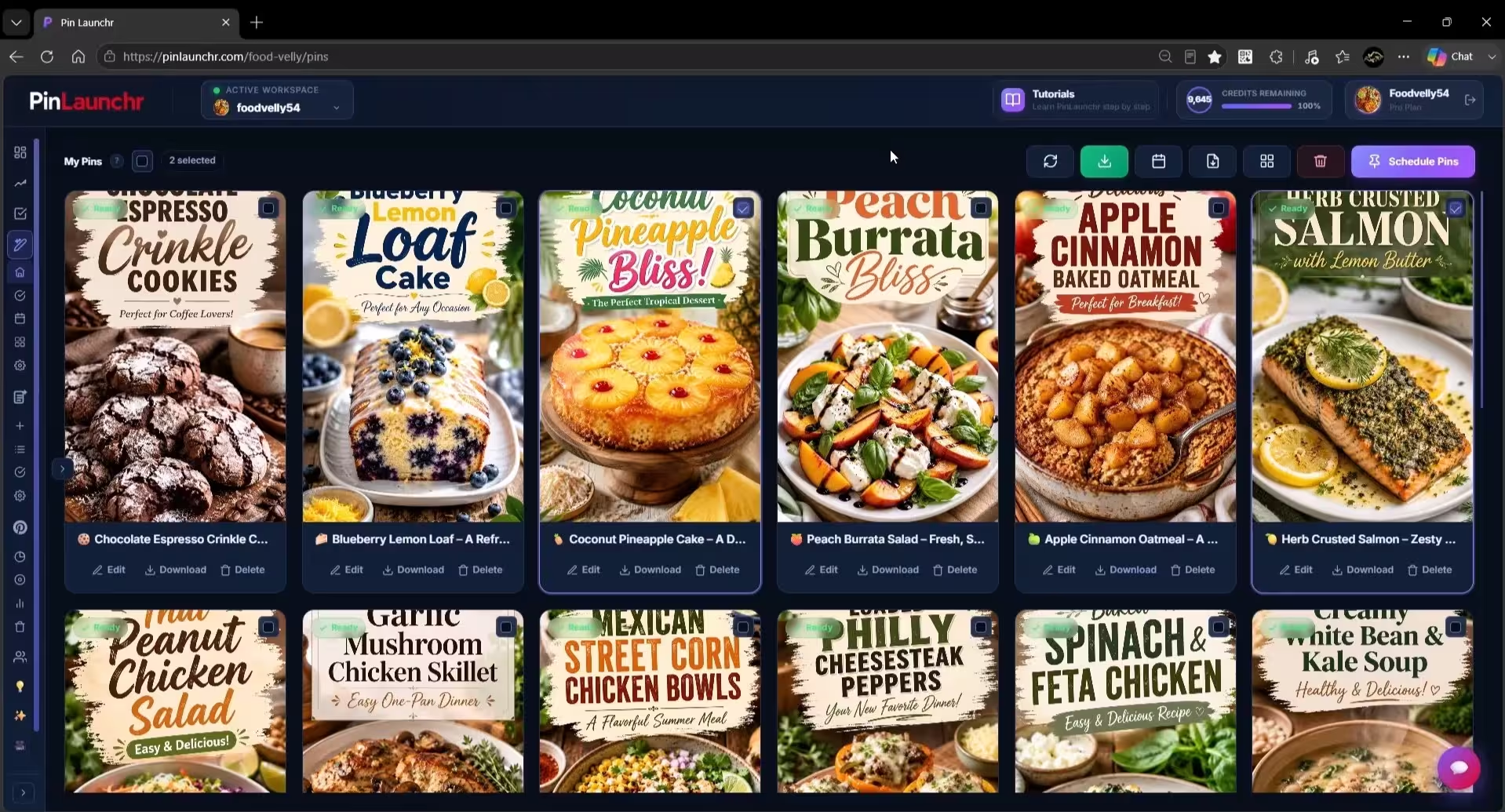
Bulk Create Pinterest Pins From CSV Files
Built for repeatable content production — one file in, a batch of publish-ready pins out.
Upload a CSV file or use spreadsheet-style data as your content source.
Create batches of AI pin designs from your rows in one run.
Every generated pin comes with an SEO title and description.
Check and refine each pin in the review queue before it goes out.
Reuse the same workflow whenever you need a new batch of content.
Best Use Cases for CSV Workflows
Create pins for a whole list of blog posts in one batch.
Turn product listings into fresh Pinterest pin designs.
Produce pins for offers, reviews, and roundups at volume.
Cover an entire product collection with one CSV file.
Batch pin production for client accounts and campaigns.
Prepare holiday and seasonal content ahead of time.
Why Use CSV Workflows?
Generate a batch of pins in the time it takes to make one by hand.
Work in campaigns and content batches instead of one-off pins.
Keep each campaign's inputs together in a single file.
Stop re-entering topics, URLs, and copy for every single pin.
Produce Pinterest content at the volume your growth needs.
How CSV to Pinterest Pins Works
Set up a CSV file with one content input per row.
Add topics, URLs, or content inputs to the file.
PinLaunchr generates pin images, titles, and descriptions for the batch.
Review, edit, schedule, or publish your Pinterest pins.
What Your CSV Needs
Less than most people expect. There is no template to download and no fixed column order to match.
PinLaunchr reads a CSV by looking at your header row and matching column names, not positions. Rearranged columns, extra columns you keep for your own bookkeeping, and different capitalisation all work. Every column below is optional — include the ones you actually have.
| Column | Header names that match | What PinLaunchr does with it |
|---|---|---|
| Link | Link, URL, Destination URL | The page the pin sends people to, and the source the pin is built from |
| Title | Title, Pin Title | Kept exactly as written |
| Description | Description, Desc | Kept exactly as written |
| Media URL | Media URL, Image, Image URL | An image you already have, used instead of generating one |
| Keywords | Keywords, Interests, Tags | Comma- or semicolon-separated; steers the copy toward the searches you care about |
Columns PinLaunchr does not recognise are ignored rather than rejected, so you can point it at an export you already have.
A minimal file
One column is a complete CSV. Each row is a brief, not a finished pin:
Link
https://example.com/store-winter-coats-small-flat
https://example.com/entryway-organisation-ideas
https://example.com/renter-friendly-storage
A fuller file
Add columns when you already have copy worth keeping. Quote any cell containing a comma:
Title,Description,Link,Keywords
"Small Flat? Your Coats Have a Home","Five storage ideas that need no drilling",https://example.com/store-winter-coats-small-flat,"small apartment storage; winter closet"
,,https://example.com/entryway-organisation-ideas,"entryway organisation, hallway storage"
The second row leaves the title and description empty on purpose — the keywords still steer what gets written for it. Mixing both styles in one file is fine.
No header row at all
If none of your column names match, PinLaunchr does not fail. It reads the file as a plain list and loads the first cell of every row as a pin input — so a one-keyword-per-line or one-URL-per-line file works with no header whatsoever. That is the quickest way to start, and it is the route the bulk keyword upload guide walks through end to end.
The difference matters once you are running batches. A headerless list arrives as raw input and generates straight through. A file with recognised columns arrives as pins that already carry your copy, so nothing you wrote gets overwritten — select those rows and run a generate action when you want the missing pieces filled in.
Exporting a Pinterest Bulk Upload CSV
CSV runs both ways. Generate the pins in PinLaunchr, then export them as a bulk upload file.
A good share of people searching for a Pinterest bulk upload CSV want this half of the job: a file of finished pins, ready to hand over. PinLaunchr writes one with these eight columns, in this order.
| # | Column | Contents |
|---|---|---|
| 1 | Title | The pin title |
| 2 | Description | The pin description |
| 3 | Media URL | The pin image |
| 4 | Link | The destination URL |
| 5 | Pinterest board | The board the pin belongs on |
| 6 | Publish date | YYYY-MM-DD HH:MM — read from your scheduled queue when the pin is already queued, so the file matches what the scheduler will actually do |
| 7 | Thumbnail | Optional thumbnail |
| 8 | Keywords | Comma-separated keywords for the pin |
Split export, and the reason it exists
A second export writes the same pins across several smaller files of twelve rows each. Twelve is not an arbitrary chunk size, and the split is not a simple slice — it is deliberate about destination links. Rows pointing at the same URL get spread across different files rather than stacked into one, and where a repeat is unavoidable the link gets a ?pin=2 suffix so no two rows inside a single file carry an identical destination.
Repeated destination URLs are one of the most common reasons a batch comes back with rows rejected, and untangling that by hand in a spreadsheet of four hundred is exactly the kind of work nobody should be doing twice.
Files are written as UTF-8, and any cell containing a comma, a quote, or a line break is quoted and escaped on the way out.
What Usually Goes Wrong With a Pinterest CSV
A handful of failures account for nearly every broken batch — and all of them are fixable in the spreadsheet.
A title like Easy, Cheap Storage splits into two columns unless the cell is wrapped in double quotes. Exporting from a spreadsheet handles this for you; hand-written files usually do not.
A column called Page or Product matches nothing known. PinLaunchr falls back to reading the file as a plain list, which is often still what you wanted — rename it to Link when you want the columns mapped properly.
Curly quotes and accented characters turn to mojibake when a file is saved in a legacy encoding. Save as UTF-8 CSV. This bites hardest on non-English content.
A Media URL pointing at a product page rather than a file, or at an image behind a login, cannot be fetched. Leave the column out entirely and let the pin image be generated instead.
The same URL on several rows is usually deliberate — several angles on one page. It only becomes a problem at upload time, which is precisely what the split export handles.
Publish dates want YYYY-MM-DD HH:MM. Spreadsheets love to reformat a date column into something local the moment the file is opened — check it after saving, not before.
A CSV Batch vs Making Each Pin by Hand
| One pin at a time | A CSV batch | |
|---|---|---|
| Where the image comes from | You design it | Generated, or your own Media URL |
| Title and description | You write both, per pin | Written per row, editable afterwards |
| Cost of one more pin | The same as the first one | One more row |
| Approval | Implicit | Review queue — you approve each pin |
| Worth it at | A handful of pins | Dozens to hundreds |
And versus uploading a CSV to Pinterest yourself
These are not the same job, and it is worth being blunt about the difference because both get called "bulk upload".
A bulk upload file handed to Pinterest describes pins that already exist. You supply the finished image, the written title, the description and the link; the upload only saves you the clicking. Every image in that file still had to be made somewhere first.
A CSV going into PinLaunchr is the opposite end of the same pipeline: each row is a brief, and the image and copy get produced from it. That is why the input file needs so few columns while the export file needs eight. If you already have four hundred finished images, you do not need this page — you need the export above. If you have four hundred URLs and no images, this is the half that was missing.
One rule neither route escapes: Pinterest requires that a person chooses each pin before it publishes, which is why generated batches land in a review queue rather than going straight out. From there they hand off to the Pinterest scheduler, or you take the export and upload it yourself.
Who CSV Workflows Are For
CSV workflows are for anyone producing Pinterest content at volume. PinLaunchr is built for bloggers, Etsy sellers, affiliate marketers, agencies, and businesses that use Pinterest to create traffic, leads, and sales.
See how PinLaunchr fits bloggers and Etsy sellers, or start from the AI Pinterest pin generator and Pinterest scheduler.
Who This Is Best For — And Who It Isn't
No tool fits everyone. Here is an honest look at when CSV bulk workflows in PinLaunchr are the right choice.
Best for
- Bloggers creating pins for a whole catalog of posts
- Etsy sellers covering entire product collections
- Affiliate marketers producing pins for offers at volume
- Agencies batching Pinterest campaigns for clients
- Users who want AI pin creation, SEO titles, descriptions, scheduling, CSV workflows, and analytics in one place
Not best for
- Users who do not use Pinterest
- Users who only make a few one-off pins and never batch content
- Users who only need a general-purpose graphic design tool
- Users who need full manual design control over every tiny detail
- Users expecting guaranteed traffic, saves, clicks, or sales
CSV to Pinterest Pins FAQ
Can I create Pinterest pins from a CSV file?
What should I include in my CSV file?
Can PinLaunchr generate Pinterest titles and descriptions from CSV data?
Is CSV pin creation useful for agencies?
Can I review pins before publishing?
Is there a Pinterest CSV template I need to follow?
Can PinLaunchr export a Pinterest bulk upload CSV?
What columns does a Pinterest CSV upload need?
How many pins can I create from one CSV?
Can pins created from a CSV be scheduled?
Why did my CSV import read the wrong columns?
Create Pinterest Pins in Bulk
Turn CSV rows into Pinterest-ready pins with AI images, SEO titles, and descriptions — then review, schedule, or publish from one dashboard.