Pinterest Tool for Bloggers
PinLaunchr is an AI Pinterest content platform. Turn blog posts, keywords, and article URLs into Pinterest-ready pins faster: create AI pin images, SEO titles, descriptions, and scheduled Pinterest content from one dashboard.
Built for bloggers, Etsy sellers, affiliate marketers, agencies, and businesses that use Pinterest to create traffic, leads, and sales.
Why Bloggers Use Pinterest
Pinterest is a visual discovery platform where people search for ideas, tutorials, and inspiration. Blog content is a natural fit: a single pin can keep surfacing in search and feeds long after it is published, sending readers to your posts over time.
The hard part is production — every post needs pins, fresh designs, and SEO copy. PinLaunchr focuses on making that production fast and repeatable for bloggers.
The blog-to-Pinterest workflow is simply this: paste a post URL, and PinLaunchr reads the article, finds the distinct angles inside it, and builds a pin for each. One post is rarely one pin — a recipe post is the recipe, the make-ahead tip, the substitution list and the seasonal version, and each of those is a different search. That is what it means to turn blog posts into Pinterest pins properly, rather than pinning the featured image four times and calling it a strategy.
It works with any blogging platform, because it works from URLs. If you publish on WordPress there is a deeper route: the WordPress plugin scores your entire published archive for Pinterest potential and can generate and schedule pins automatically the moment you hit Publish.
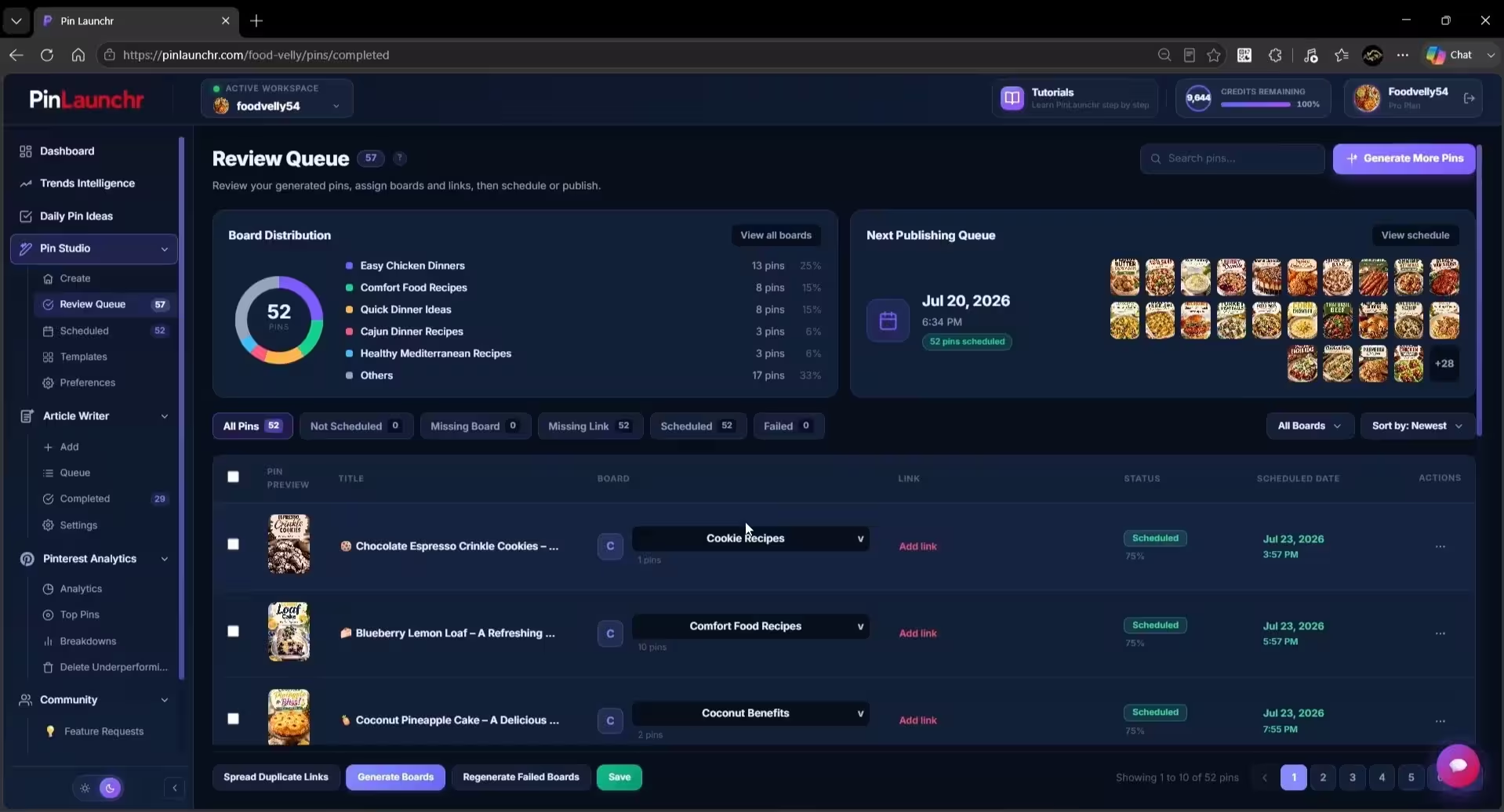
A Real Look at Pin Review
An actual screenshot from the PinLaunchr app — not a mockup.
How PinLaunchr Helps Bloggers
Paste a blog post URL and generate Pinterest pins for it.
Turn long-form articles into Pinterest-ready pin designs.
Start from a topic or keyword when you don't have a URL yet.
Get search-friendly Pinterest copy generated with every pin.
Queue pins so your boards stay active consistently.
See how pins perform with built-in Pinterest analytics.
The Blog-to-Pin Workflow in 5 Steps
Add your blog post URL or a keyword.
PinLaunchr creates designed Pinterest pin images with AI.
SEO titles and descriptions are generated with each pin.
Fine-tune designs and copy in the built-in editor.
Send pins to your connected Pinterest account.
Blog Niches Commonly Active on Pinterest
Examples of blog niches with a strong Pinterest presence — shown as examples, not a guarantee of results in any niche.
Recipes, meal ideas, and cooking guides are core Pinterest searches.
Destination guides and itineraries suit visual pin formats.
Step-by-step projects and tutorials work as saveable ideas.
Room inspiration and decor ideas are natural Pinterest topics.
Outfit and beauty content fits Pinterest's visual search.
Activity ideas and family tips are frequently searched.
Workouts and wellness routines are popular saved content.
Budgeting and money tips work well as list-style pins.
How-to and strategy content reaches creators and founders.
Benefits for Bloggers
Generate designed pins in minutes instead of building each one by hand.
Create fresh pins for your back catalog, not just new posts.
Make several designs per post to see what resonates.
Every pin ships with keyword-aware titles and descriptions.
Scheduling keeps pins publishing even during busy weeks.
Who This Is Best For — And Who It Isn't
No tool fits every blogger. Here is an honest look at when PinLaunchr is the right choice for blog promotion.
Best for
- Bloggers creating Pinterest pins for new and old posts
- Bloggers who want SEO titles and descriptions generated with each pin
- Bloggers turning post URLs directly into pins
- Bloggers who batch content and schedule ahead
- Bloggers who want creation, scheduling, and analytics in one place
Not best for
- Bloggers who do not use Pinterest as a traffic channel
- Users who only need a general-purpose graphic design tool
- Users who want to manage every social network from one platform
- Users who need full manual design control over every tiny detail
- Users expecting guaranteed traffic, saves, clicks, or sales
The Features Behind This Workflow
Blog-to-pin workflows run on the AI Pinterest pin generator, the Pinterest scheduler, and CSV to Pinterest pins for bulk batches. Learn more about PinLaunchr.
Not running a blog? The same three features are put together differently for each kind of site — see all the Pinterest use cases for the Shopify, Etsy and WordPress versions of this workflow.
Working through a back catalogue by hand instead? The free tools cover the same steps one post at a time: find the searches with the Pinterest keyword generator, get several angles per post from the pin idea generator, and sort the results into boards named with the board name generator.
Pinterest Tool for Bloggers FAQ
What is a good Pinterest tool for bloggers?
Can I create Pinterest pins from blog posts?
Can PinLaunchr help bloggers write Pinterest titles and descriptions?
Can bloggers schedule pins with PinLaunchr?
Can I create multiple pins for one blog post?
Turn Your Blog Content Into Pinterest Pins
Add a blog post URL or keyword, generate AI pin images with SEO titles and descriptions, then schedule or publish — all from one dashboard.