PinLaunchr vs Pintrio
Compare PinLaunchr and Pintrio for Pinterest content creation, scheduling, and workflow management. This guide helps you decide which tool fits your Pinterest marketing needs — based on workflow, not hype.
PinLaunchr is built for bloggers, Etsy sellers, affiliate marketers, agencies, and businesses that use Pinterest to create traffic, leads, and sales.
PinLaunchr and Pintrio at a Glance
This comparison exists to help you choose based on workflow fit, not to declare a single winner. PinLaunchr is an AI Pinterest content platform focused on Pinterest-first workflows: it helps users create AI Pinterest pins, schedule content, build CSV bulk workflows, turn URLs and articles into pins, generate SEO titles and descriptions, and track performance with analytics.
Pintrio is described here using neutral wording. We did not independently verify Pintrio's current feature set, pricing, or limits, so where we are unsure we say so rather than guess. Before choosing, review Pintrio's official website for the latest details — and pick the tool whose current workflow genuinely matches how you work.
The Short Answer
Both tools can help with Pinterest — the right pick depends on what you need most.
You want an AI-first Pinterest content platform that creates pins, SEO titles, and descriptions, supports CSV and URL/article-to-pin workflows, schedules content, manages multiple brands, and tracks analytics — all from one dashboard.
Its current feature set, interface, pricing, or workflow better matches your specific Pinterest needs. Check Pintrio's official website for the latest details before committing.
Which Tool Fits Your Need
A quick map of common needs to the better-fit tool. "Check both" means it comes down to current details you should verify.
| User need | Better fit | Why |
|---|---|---|
| AI Pinterest pin generation | PinLaunchr | It generates the designed pin images for you |
| Pinterest SEO titles & descriptions | PinLaunchr | Generated automatically with each pin |
| CSV / bulk Pinterest workflows | PinLaunchr | Built-in bulk generation from CSV files |
| URL / article-to-pin workflows | PinLaunchr | Paste a URL or article to create pins |
| Pinterest scheduling workflow | PinLaunchr | Scheduling via the official Pinterest API |
| Blog article generation | PinLaunchr | Built-in Article Writer for long-form content |
| Workspace / brand management | PinLaunchr | Separate workspaces per website or brand |
| Analytics | PinLaunchr | Per-pin performance tracking built in |
| Existing Pintrio users | Pintrio | If it already fits your workflow, no need to switch |
| A specific Pintrio feature you need | Pintrio | If verified on Pintrio's current product |
| Comparing current pricing | Check both | Pricing changes — compare both official pricing pages |
This reflects PinLaunchr's implemented features and neutral, unverified positioning for Pintrio. Verify Pintrio's current capabilities on its official site.
Feature-by-Feature Comparison
PinLaunchr entries reflect features available in the product today. Pintrio entries use neutral wording where we could not verify current details — always check Pintrio's live product.
| Feature | PinLaunchr | Pintrio |
|---|---|---|
| AI Pinterest pin generation | ✓ Generates designed Pinterest pin images with AI | Check current feature set |
| Pinterest scheduling | ✓ Queue pins or publish instantly via the official Pinterest API | Check current feature set |
| Bulk CSV workflows | ✓ Bulk pin generation from uploaded CSV files | Check current feature set |
| URL / article-to-pin generation | ✓ Paste a website or article URL to create pins for it | Check current feature set |
| Pinterest SEO title generation | ✓ SEO titles generated with every pin | Check current feature set |
| Pinterest description generation | ✓ SEO-style descriptions generated with every pin | Check current feature set |
| Blog article generation | ✓ Built-in Article Writer for long-form blog content | Check current feature set |
| Workspace / brand management | ✓ Separate workspaces per website or brand | May vary by plan — not verified |
| Analytics | ✓ Per-pin performance tracking built in | May vary by plan — not verified |
| Ease of use | Guided, AI-first workflow; some learning curve for the full feature set | Not verified — try Pintrio directly |
| Best user type | Bloggers, Etsy sellers, affiliate marketers, agencies & businesses on Pinterest | Check Pintrio's current positioning |
Feature availability changes over time. This comparison is informational — verify each product's current features and pricing on its own website.
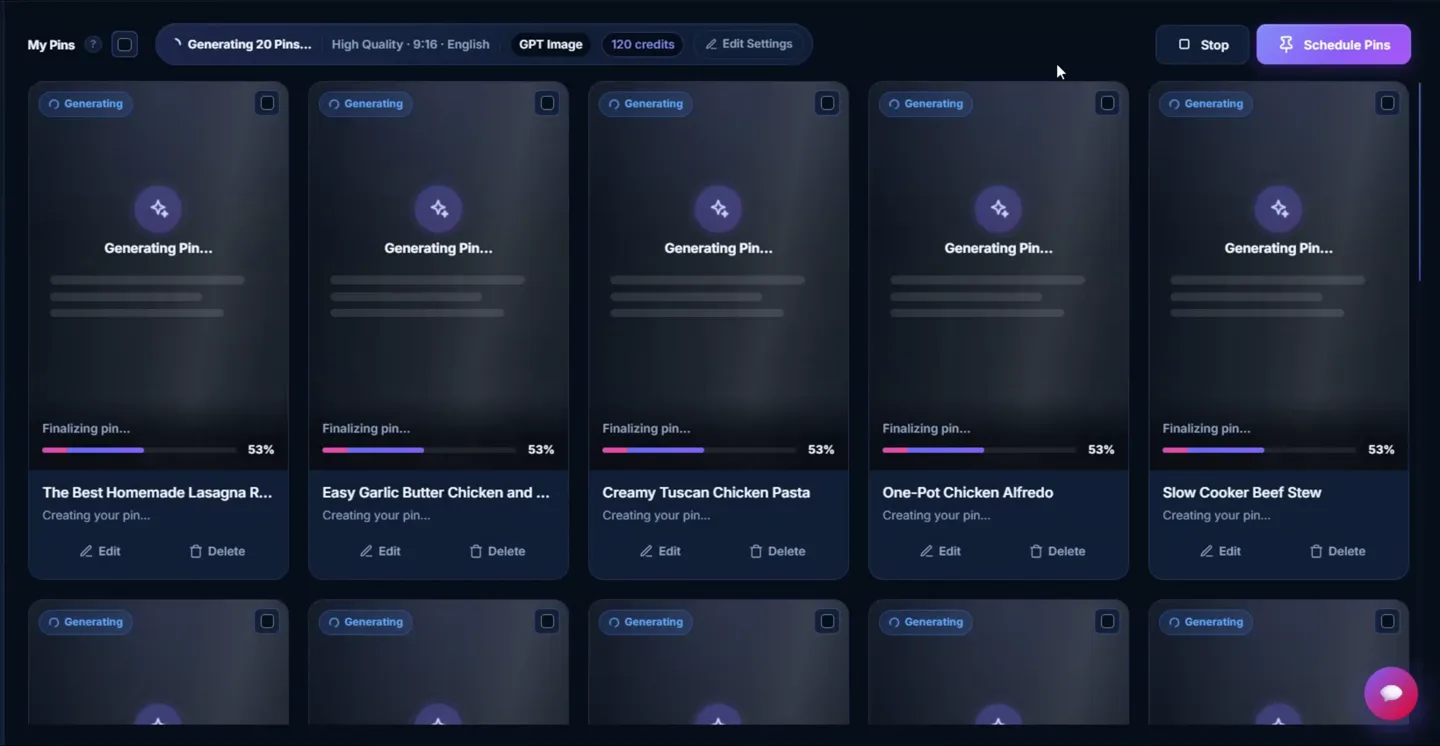
What PinLaunchr Actually Looks Like
An actual screenshot from the PinLaunchr app — not a mockup.
How Each Workflow Runs
- Add a keyword, URL, article, or CSV file
- Generate AI Pinterest pin images
- Generate SEO titles and descriptions
- Review and customize in the editor
- Schedule or publish to Pinterest
- Track performance and improve
Pintrio's workflow may vary depending on its current feature set. We did not verify it, so review Pintrio's current product pages before choosing to confirm how creating, optimizing, and scheduling pins actually works there.
A Fair Note on Pricing
PinLaunchr offers Starter, Growth, and Pro subscription plans with monthly credits. There is no free trial: your subscription starts immediately after checkout and your plan's credits are available right away. Because plan amounts can change, see the current numbers on the pricing page rather than trusting a figure quoted here.
We do not include exact Pintrio pricing here because competitor pricing can change. Check Pintrio's official pricing page for current plan details and limits.
We deliberately avoid quoting exact Pintrio pricing here because competitor pricing changes often. Check each product's official pricing page for current plan details.
PinLaunchr: Strengths & Trade-offs
Pros
- Pinterest-first AI content workflow in one place
- AI pin creation with SEO titles and descriptions
- CSV bulk workflows for producing pins at scale
- URL and article-to-pin workflows
- Scheduling via the official Pinterest API, plus analytics
- Useful for bloggers, Etsy sellers, affiliate marketers, agencies, and businesses
Cons / trade-offs
- Focused mainly on Pinterest, not every social platform
- May be more than you need if you only want manual design control
- Getting the full value means running your workflow inside PinLaunchr rather than stitching separate tools
Pintrio: Strengths & Trade-offs
Pros
- May be useful for Pinterest users depending on its current feature set
- May fit users already familiar with its workflow and interface
- May be a better fit if it offers a specific feature PinLaunchr does not focus on
Cons / trade-offs
- Feature availability should be verified on Pintrio's official website
- Pricing and plan limits may change and are not listed here
- May not match users who specifically want PinLaunchr's AI-first Pinterest workflow
Choose PinLaunchr, or Choose Pintrio
Choose PinLaunchr if…
- You want AI-generated Pinterest pins
- You want Pinterest SEO titles and descriptions
- You want CSV / bulk workflows
- You want URL / article-to-pin workflows
- You want Pinterest scheduling and analytics in one workflow
- You are a blogger, Etsy seller, affiliate marketer, agency, or business using Pinterest
Choose Pintrio if…
- You already use Pintrio and like its workflow
- Pintrio has a specific feature you need
- Pintrio's current pricing or interface fits your needs better
- You have verified that its current feature set matches your workflow
More Ways to Compare
Want the wider landscape? Read the guide to the best AI Pinterest tools, or compare PinLaunchr vs Tailwind, PinLaunchr vs Pintrio, and PinLaunchr vs the Pinterest native scheduler.
Dig into the features that shape this comparison: the AI Pinterest pin generator, the Pinterest scheduler, and CSV to Pinterest pins. Prefer to try before signing in? Use the free Pinterest title generator, description generator, keyword generator, and pin idea generator. New here? Start with about PinLaunchr.
PinLaunchr vs Pintrio FAQ
What is the difference between PinLaunchr and Pintrio?
Is PinLaunchr a Pintrio alternative?
Does PinLaunchr generate AI Pinterest pins?
Can PinLaunchr create pins from URLs or CSV files?
Which tool is better for bloggers?
Which tool is better for Etsy sellers?
Should I choose based on features or pricing?
Does PinLaunchr guarantee Pinterest traffic?
Try an AI-First Pinterest Content Workflow
Create Pinterest pins, SEO titles, descriptions, CSV workflows, URL/article-to-pin campaigns, scheduling workflows, and analytics from one PinLaunchr dashboard.